Using Stimulsoft Reports you may make calculation of aggregate functions in the code of events of a report. This allows calculating aggregate functions with complex logic or condition. Another advantage of Stimulsoft Reports is that, when calculating, you call the value to be calculated from the report code and make changes. If you want to make such a calculation, the variable which stores the value of an aggregate function is required. For this, you should create a new variable in the data dictionary.
 Important!
Using
variables from the code to store the result of an aggregate
function calculation is not allowed. It is necessary to use
variables created in the dictionary.
Important!
Using
variables from the code to store the result of an aggregate
function calculation is not allowed. It is necessary to use
variables created in the dictionary.
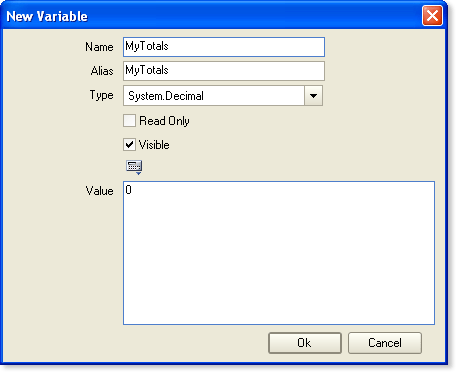
Here you specify the type of a variable, for example Decimal, and the initial value is zero. Then in the Render event of the Data band you should set the code for a variable increment. For example, if you want to calculate the sum of variables of the Products.ItemsInStock field then the code will be as follows:
MyTotals += Products.ItemsInStock;
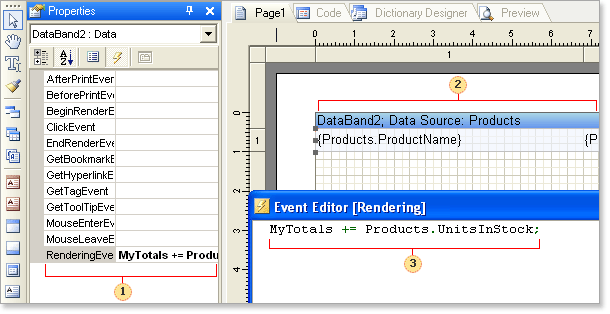
 The RenderingEvent
event
The RenderingEvent
event
 The Data
band in what
the RenderingEvent
event
calculation will be made
The Data
band in what
the RenderingEvent
event
calculation will be made
 The code for calculating
the sum
The code for calculating
the sum
For calling the variable, that contains the value of a total, write in the following in the text expression:
{MyTotal}
If, after you have written the text expression, you run the report rendering. Then, when the report rendering will reach the component which contains the expression with the total variable, then there will be an output of this variable. Therefore, you should specify to the report generator that the component output must be done right after the whole report rendering - when the variable will be calculated completely. For this, you must set the ProcessAtEnd property of the text component to true.
Notice.
Expressions of
text components which the ProcessAtEnd
properties are
set to true
are always
calculated at the end of the report rendering.
As was written before the total will be calculated and shown in the proper part of a report.
