Different report designers support different UI's. The Standard mode uses toolbars as in Microsoft Office 2003. The Ribbon mode uses "ribbon tabs". Compatibility of designers and UI types is shown in the table below:
|
UI type |
Reports.NET |
Reports.Wpf |
Reports.Web |
Reports.Silverlight |
|
Standard (Microsoft Office 2003) |
+ |
+ |
|
|
|
Ribbon (Microsoft Office 2007) |
+ |
+ |
+ |
|
|
Ribbon (Microsoft Office 2010) |
|
+ |
|
+ |
For Stimulsoft Reports.Net the UI type is offered to choose when first running the report designer. Also the UI type can be chosen in the GUI tab of the Options window of the report designer. The picture below shows the GUI tab of the Options window of the report designer:

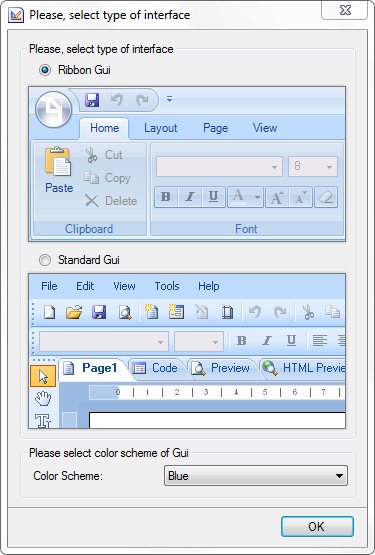
As seen on the picture, it is possible to choose either Standard or Ribbon UI. The color scheme of UI can also be changed. The following types of color themes are available: Blue, Silver, Black. The full path for invoking the Options window in the Ribbon UI: Main Menu -> Options button -> Options window. The full path for invoking the Options window in the Standard UI: Tools menu -> Options -> Options window. If you need to change the UI type before running the designer, then hold on the "Ctrl" button when loading the designer. The Select the type of GUI window will be invoked. The picture below shows Select the type of GUI window:
When Stimulsoft Reports.Wpf is run first the user will not see the Select the type of GUI. The designer will be loaded with the default Ribbon 2010 UI White theme. To change the type of UI, it is necessary to call the Options window in the Gui tab and make changes. The picture below shows the Gui tab of the Options window with the color themes drop down list:
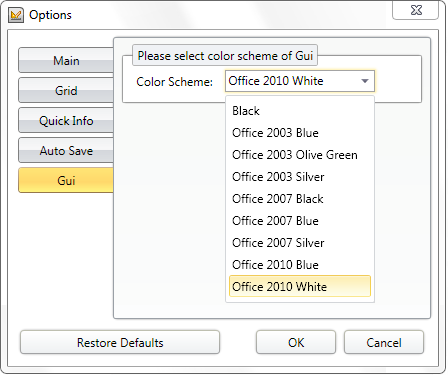
As seen on the picture, in Stimulsoft Reports.Wpf, it is impossible to separately change the UI type and the color theme. A type of UI corresponds to a definite color theme. The full path for invoking the Options window in Ribbon 2010 UI: Main Menu - Options - Options window. The full path for invoking the Options window in Ribbon 2007 UI: Main Menu - Options button - Options window. The full path for invoking the Options window in Standard UI: View - Options - Options window.
Stimulsoft Report.Web supports Ribbon 2007 UI Blue theme.
Stimulsoft Report.Silverlight supports Ribbon 2010 UI Blue theme.